Scan to get


 Scan to get



 Scan to get






What this tool does
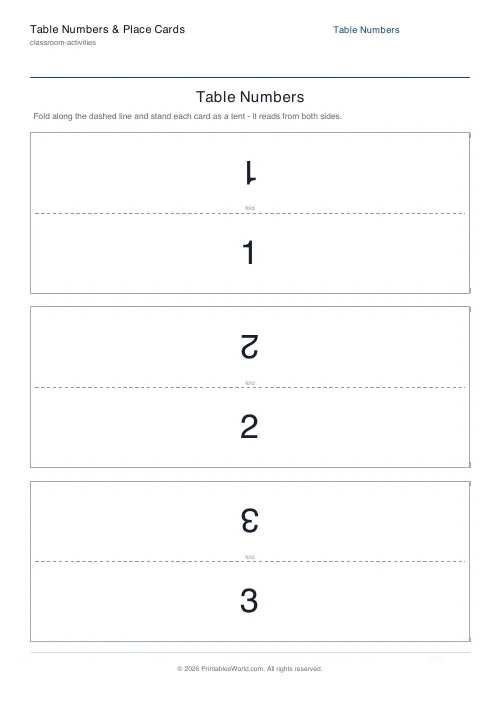
Foldable tent cards in two modes. Table numbers counts up from whatever starting number you give it, as far as three hundred tables, and place cards turns a pasted guest list into one named card each. The label prints twice on every card: once upright, once rotated 180 degrees. Fold it and both faces read correctly. One to six cards a page. The border, the corner cut marks and the fold hint can each be switched off.
People also used
Feedback
Spotted something off with this tool?
One card, two faces, no assembly
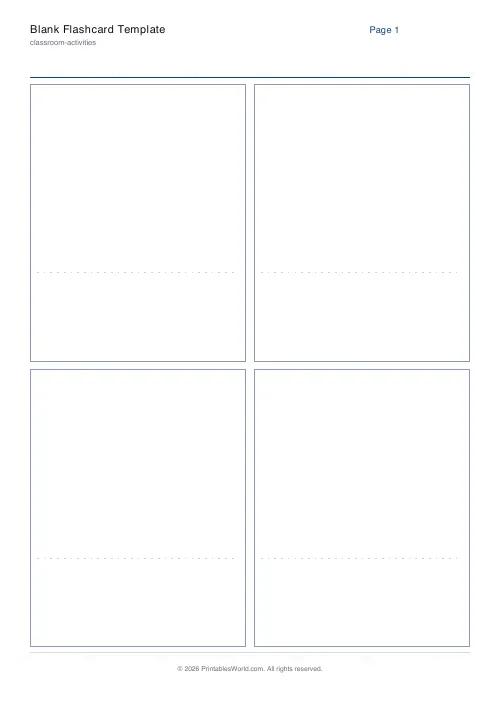
Each rectangle is split across the middle by a dashed fold line. The lower half carries the label the right way up, and the upper half carries the same label rotated a full 180 degrees so that it will read correctly once the card is standing.
Fold it into a triangle, stand it up, and both sides read correctly. A guest walking towards the table sees their name, and you see it from the front of the room. Nothing to glue, no holder to buy, no slot to work out.
Numbers or names
Table numbers takes a count and a starting number and runs from there, up to three hundred tables. Starting somewhere other than one matters more than it sounds: a marquee with tables 40 to 60 in it wants exactly that range and nothing else.
Place cards takes a guest list pasted one name per line and prints a card each. Both modes take an optional sub-line underneath, which is a welcome message under a number, or the table name under a guest's name so people can find their seat from across a room.
Cards per page decides the size
One to six. Three by default. One per page gives a large display number for a buffet or a registration desk, and six gives the compact place cards that a seating plan for eighty people actually needs.
Run both from the same tool for one event: large single numbers for the stations, small place cards for the tables. A full set is a handful of sheets either way.
Borders, cut marks, and the word fold
Three things can be switched off: the card border, the corner cut marks, and the small word fold printed on the crease. All three are on to start with.
Keep the fold hint for anything a volunteer is assembling, because it removes the one question that gets asked. Turn it off for a wedding, where a printed instruction on the card is the sort of thing people notice. Cut marks come off for the same reason once you trust the trim.
Beyond weddings
Numbered tents mark group tables, learning stations and rotation centres in a classroom, and they save a great deal of explaining on a day with six activities running at once.
Named cards do assigned seating, parents' evening desks, reading-corner spots, and the conference registration table where nobody can find their badge. Same generator, same fold, different list.
FAQs
Quick answers
What is the difference between the two modes?
Table numbers prints a run of big numbered tents. Set how many tables you have and the starting number. Place cards turns a pasted list of guest names into one named tent per person. Both produce the same foldable card; only the label changes.
Why is each label printed upside-down on the top half?
Once you fold the card into a tent, the upper half flips to face the other way. Printing it rotated 180 degrees means the number or name reads the right way up from both sides once the card is standing.
How many cards can I print at once?
Up to 300, laid out across as many pages as needed using your chosen cards-per-page setting. Long guest lists and large table counts are handled automatically.
Do I have to cut the cards out?
No. You can fold each card straight off the sheet. If you want clean edges, turn on cut marks and trim along the corner guides before folding.
Related tools
Further reading
Classroom Activities
How to run a classroom economy (free printables)
A classroom economy teaches money, work and choice at once. But it collapses if the maths is wrong. Here is how to set the numbers, and the four pitfalls to avoid.
5 min read
Classroom Activities
20 classroom games that need zero prep
Games organised by the gap they fill: two minutes at the end of a lesson, ten minutes before assembly, or a whole wet lunchtime. Almost all need nothing but a voice.
6 min read
Classroom Activities
Positive reinforcement in the classroom: charts that work
Reward charts work when they name a specific behaviour and fade over time. They backfire when they rank children publicly. Here is the difference in practice.
5 min read