PW PrintablesWorld

Classroom Activities

Birthday Certificate

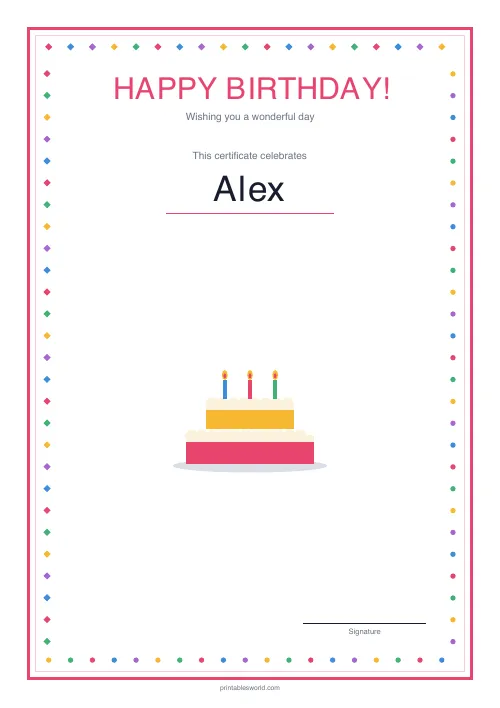
A cheerful "Happy Birthday!" certificate with a colourful border.

Last updated:

What this tool does

A warm, colourful birthday certificate you can personalise in seconds. Fill in the name, optional age and date, and the PDF prints with a bright confetti-style border and space for a signature.

Settings

Configure the certificate

Happy Birthday — personalise and print.

Paper size

Preview

Sample

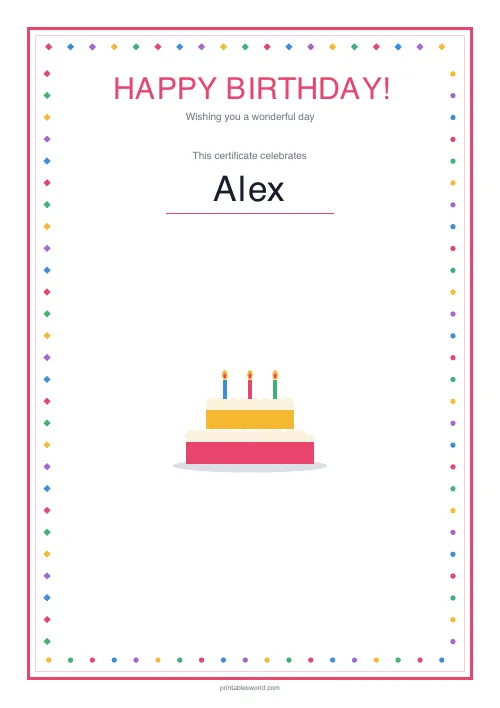
HAPPY BIRTHDAY
Wishing you a wonderful day
Alex

People also used

Create a Cheerful Printable Birthday Certificate

Celebrate a birthday with a bright, colourful "Happy Birthday!" certificate you can personalise in under a minute. Type the child's name, optionally add their age and the date, and download a printable PDF framed with a confetti-style border and a neat space for a signature at the bottom.

Use it as a keepsake for a classroom birthday, a present-opening moment at home, a nursery or youth-club celebration, or a surprise pin-up for a party. The layout is warm and playful without being babyish, so it works from toddlers through to tweens. Output is available in A4 or US Letter PDF format.

This birthday certificate template is free, has no sign-up, and uses the shared branded PrintablesWorld layout so every certificate prints neatly and consistently.

Why use this birthday certificate maker?

A personalised certificate turns a simple "happy birthday" into something a child can hold on to. It is a lovely add-on to a card, a tidy keepsake to go up on the bedroom wall, and a reliable go-to for teachers and youth-group leaders who want to mark birthdays without buying bespoke cards every time. Use it for:

  • classroom birthday displays and morning-circle celebrations
  • nursery and reception class birthday rituals
  • family birthday surprises tucked into a card
  • youth-club, Scouts, Brownies, and Guides birthdays
  • sports-club and dance-class end-of-year birthdays
  • homeschool celebrations and year markers
  • grandparent keepsakes for milestone ages

A printed, named certificate sends a stronger "this is just for you" signal than a generic shop-bought card.

What you can customise

  • Recipient name — typeset prominently in the middle of the certificate
  • Age (optional) — leave blank, or enter a number to add a "Turning X!" flourish
  • Date (optional) — the day of the celebration, printed at the foot
  • Signature line — toggle on to leave space for a handwritten signature at the bottom-right
  • Paper size — A4 or US Letter PDF output

The colourful confetti border, "Happy Birthday!" heading, and overall layout are fixed, which is what keeps a stack of certificates looking uniform across a classroom or family.

Notes and limitations

  • The certificate is designed for a single recipient per page — for a twins' or multiple-birthday celebration, generate one PDF per child.
  • Longer names may shrink slightly to fit the name band cleanly.
  • The colour palette is bright by design — print with colour ink for best effect, or print monochrome onto coloured card if you are out of colour cartridges.
  • Print at 100% scale so the confetti border stays inside the printable area.
  • The age field only accepts a whole number. For "half birthdays" or written descriptions, leave it blank and write it on by hand.

Who this birthday certificate is for

Parents

Slip a personalised certificate into a birthday card, or pin one to the breakfast chair for a surprise first thing in the morning.

Teachers

Maintain a consistent classroom ritual — every child gets a certificate from you on their birthday, with no last-minute rush to the card aisle.

Nursery and early-years staff

Young children love seeing their name in print. A certificate sent home after a nursery birthday celebration becomes an instant keepsake.

Club and group leaders

Scout, Guide, sports, and music-club leaders can recognise birthdays without keeping a stash of physical cards on hand.

Homeschool families

Build a tradition of a printed certificate each year — a simple, visible way to mark the passing of time.

Layout and style details

The confetti border

A bright, colourful border designed to feel celebratory without tipping into overly cartoonish territory, so it looks right for any age.

Name typesetting

The recipient name is the hero element, set in a large display face so it reads across a room when pinned to a wall or a display board.

Optional age flourish

Adding an age inserts a "Turning X!" flourish just below the name — lovely for milestone birthdays like 5, 10, 13, 18.

How to use the tool

  1. Type the recipient's name.
  2. (Optional) Enter the age.
  3. (Optional) Set the date.
  4. Turn the signature line on if you want to sign it.
  5. Choose A4 or US Letter.
  6. Click Generate.
  7. Preview the certificate.
  8. Download and print the PDF.

Worked example

Suppose a child in your class, Alex, is turning seven on the 23rd of March. Enter "Alex" as the recipient, set the age to 7, pop "23 March" into the date, and leave the signature line toggled on. The PDF prints with a confetti border, a bold "Happy Birthday!" heading, "Alex" typeset across the middle, "Turning 7!" just below, the date tucked at the foot of the page, and a signature line at the bottom-right ready for you to sign before handing it over.

Methodology

The engine renders the fixed confetti-border template inside the shared branded page, then typesets the recipient name in a large display face, conditionally inserts the "Turning X!" flourish when an age is provided, and positions the date and optional signature line at matching baselines. No content is randomised — the output is deterministic, so every child's certificate in a class set sits in exactly the same place on the page.

Helpful preset ideas

  • Name only — for a simple, classic keepsake
  • Name + age — for milestone birthdays like 5, 10, 13, 16, 18
  • Name + age + date — for a full record, good for framing
  • Signature line on — for a teacher-signed classroom tradition
  • Signature line off — for a parent-made surprise tucked in a card

Best ways to print and present

  • Print in colour for the full confetti-border effect.
  • Use 120-160 gsm card if you would like it to feel more like a keepsake.
  • Pop it into a clear plastic wallet so it arrives home unbent.
  • Pair the certificate with a small hand-written note for extra warmth.
  • Keep a shared classroom birthday calendar so no child is missed.

Designed for A4 and US Letter Printing

The certificate scales to both A4 and US Letter paper so it prints cleanly whether you are in a UK primary classroom, a US kindergarten, or a home office in either region. Print at 100% scale to keep the confetti border sharp inside the margins.

Related classroom celebration templates

FAQs

Quick answers

Is it suitable for any age?

Yes. Leave the age field blank if you would rather not show it, or type a number to add a "Turning X!" flourish.

Can I print several at once?

Generate one PDF per recipient — each uses the same colourful layout so a stack of them looks consistent.

What paper works best?

Any A4 or Letter sheet works. For keepsake copies, thicker 120–160 gsm card gives a nicer feel.

Can I add a signature?

Yes. Toggle the signature line on and the PDF leaves space for a handwritten signature at the bottom-right.

Related tools