What this tool does
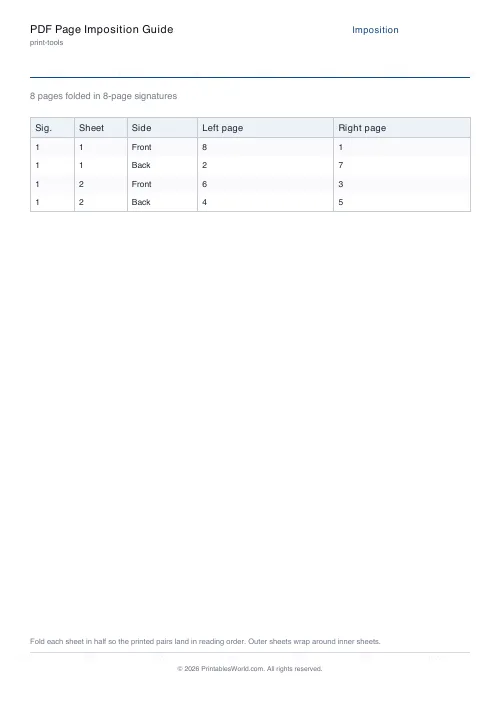
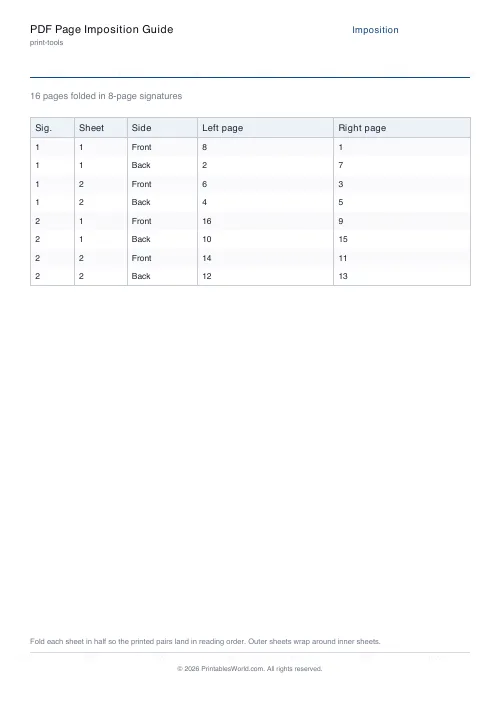
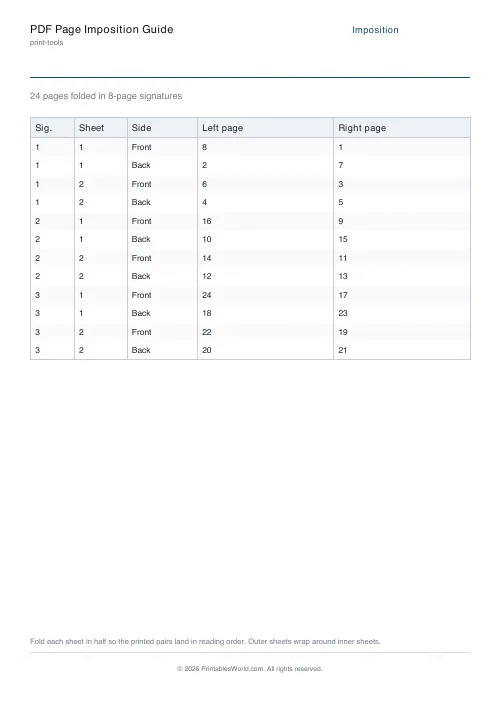
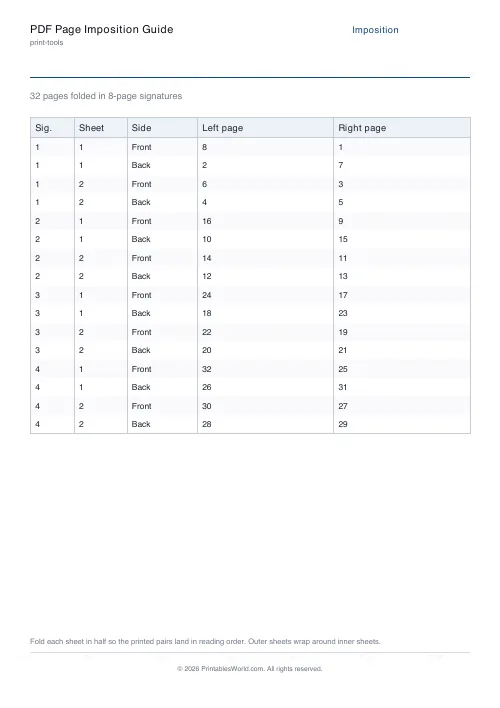
Plans a saddle-stitched booklet: which pages print on which side of which sheet, for 4-, 8- or 16-page signatures. Shown on screen and downloadable as a branded reference sheet.
People also used
Paper Sizes Calculator
Compare paper sizes and convert dimensions to pixels for accurate print design at any resolution.
Bleed and Margin Calculator
Work out full-bleed dimensions, safe zones, and margins for any trim size.
Print Quality Reference Guide
A printable reference for DPI standards, paper weights, bleed defaults, and common pitfalls.
Feedback
Spotted something off with this tool?
The page order nobody can work out in their head
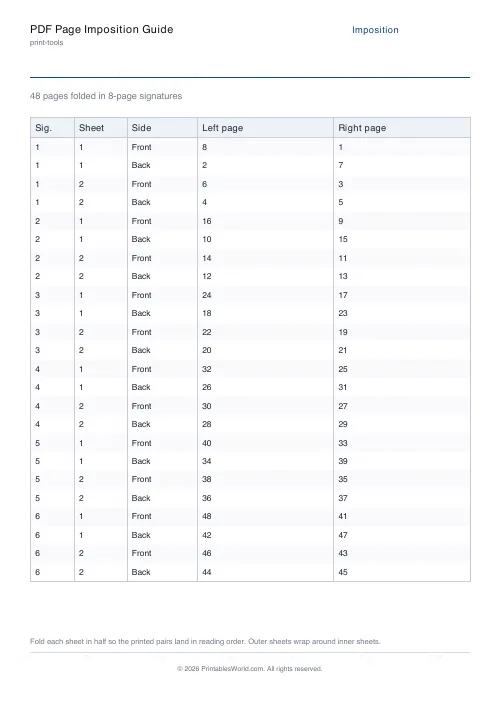
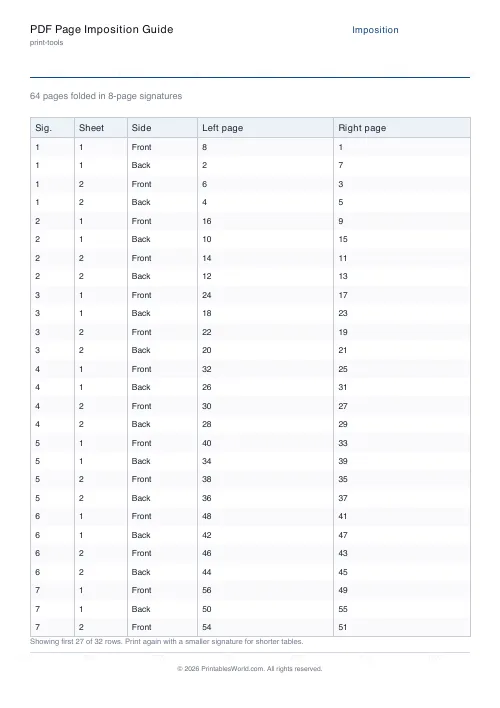
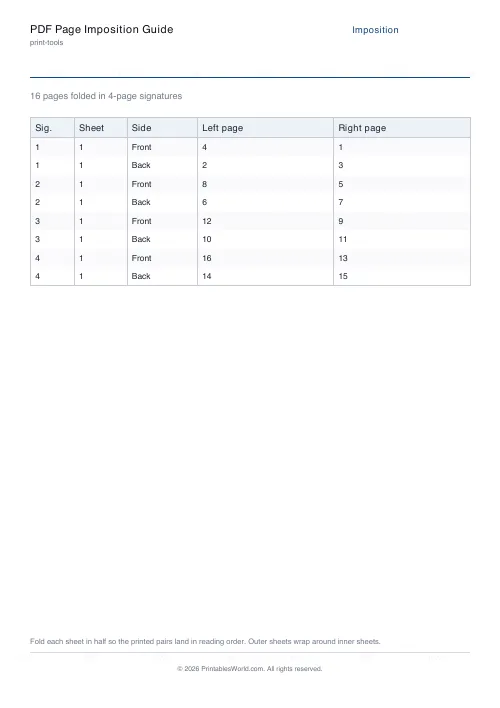
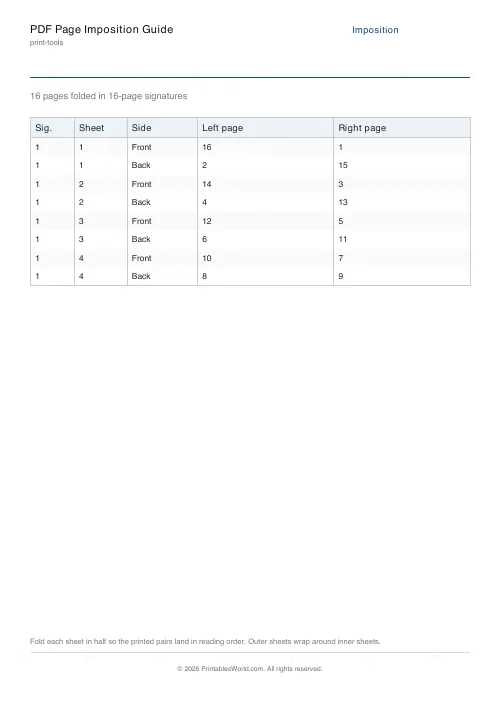
Fold a stack of sheets in half and staple the spine and you have a booklet. The trouble is that the pages do not print in reading order — on a four-page fold, the outside of the sheet carries page 4 on the left and page 1 on the right, and the inside carries 2 and 3.
Enter your page count and pick a signature size. The table tells you what goes where, sheet by sheet, side by side. Download it as a PDF and keep it next to the printer.
Signatures
A signature is one folded group. Four pages means one fold; eight means two; sixteen means three.
Small booklets use one signature and stop there. Anything longer is broken into several, each folded and then gathered in order before stitching — which is why the table restarts its numbering at each signature boundary.
Larger signatures mean fewer folds to gather and more strain on the fold, so thick paper wants smaller ones. Sixteen pages of card does not fold cleanly and does not lie flat afterwards.
Page counts must be multiples of four
One sheet folded gives four pages, so the total is always a multiple of four. It cannot be otherwise.
If your document is 14 pages the tool pads to 16 and says how many blanks it added. Better to decide where those blanks go than to let the printer put them at the back — the conventional places are after the title page and at the very end, and a blank in the middle of a spread looks like a mistake even when it isn't.
Printing it yourself
Print one side of every sheet, then reload and print the other. Which way round to reload depends on your printer's paper path, and the only reliable method is to mark a sheet, run one page, and see which way the mark came out.
Do that once with a two-sheet test before committing to a hundred. Everyone who prints booklets has a story about a run that came out upside down on the reverse, and the test costs one sheet.
Creep
The inner pages of a thick booklet stick out further than the outer ones when folded, because they travel further round the fold. Trimming the fore-edge squares it up, and if you are trimming, the inner pages lose more margin than the outer ones.
For a booklet under about 40 pages on ordinary paper, ignore it. Beyond that, professional layout software shifts each spread slightly inwards to compensate. This planner handles the page order, not the creep.
Related: bleed and margin calculator for the trim allowances, and the print cost estimator for what the run will cost.
FAQs
Quick answers
What is imposition?
Imposition is the arrangement of book pages on a printer’s sheet so they end up in reading order after the sheet is folded and trimmed. It depends on the signature size you fold to.
What signature size should I use?
Folding rule of thumb: 4-page signatures for short booklets and thick paper, 8-page for typical zines, 16-page for thin paper books. The press capacity often dictates this.
Why is my page count rounded up?
Booklets must have a page count that is a multiple of the signature size. Extra pages are added as blanks at the end (or front) so every signature is filled.
Does this work for perfect-bound books?
Yes for the imposition table, but perfect binding adds a spine width and a slightly different folding pattern. Consult your binder for exact gutter offsets.
Related tools
Paper Sizes Calculator
Compare paper sizes and convert dimensions to pixels for accurate print design at any resolution.
Bleed and Margin Calculator
Work out full-bleed dimensions, safe zones, and margins for any trim size.
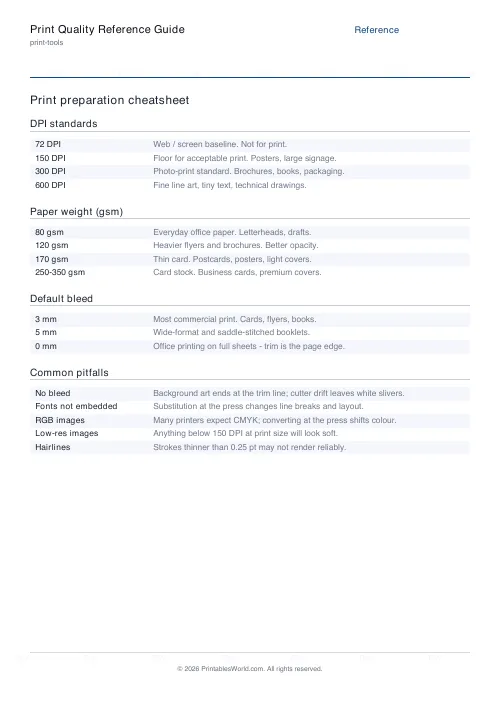
Print Quality Reference Guide
A printable reference for DPI standards, paper weights, bleed defaults, and common pitfalls.
Laminating Pouch Size Guide
Match the right laminating pouch to your document.
Further reading